


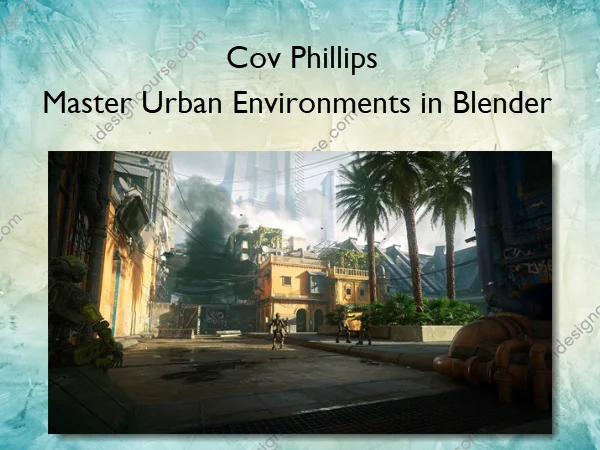
Master Urban Environments in Blender – Cov Phillips
Your all-in-one course to create epic city environments in Blender.
Have you ever tried to build an entire urban environment in 3D?
Creating buildings, adding props and filling the city streets with life? That can be an incredibly overwhelming task, but such a cool project! But it’s hard to find an all-in-one resource that teaches you to create exactly that, step by step.
That is why we created Master Urban Environments in Blender.
This course aims to cover everything that you can think of, to help you create all the city environments you can imagine. By the end of the course, you will have built your own urban scene in Blender, full of details that convey a unique mood.
This course is taught in a way that beginners can jump right in, and experienced artists will still gain vital and exciting new creative skills.
What You’ll Learn In Master Urban Environments in Blender
Part 1 – City Modeling
12 Chapters / 107 Lessons / 17+ hrs running time
Chapter 1 & 2 – Getting Started and Concepting Robots
Here we’ll gather references, which are essential for understanding shapes, colors, and textures, and can be a source of inspiration. We’ll organize these references into a comprehensive guide, that covers every aspect of our project, serving as a reference throughout the 3D creation process.
Chapter 3 – Blockout
In this chapter, we’ll explore developing a simple blockout for our environment. Before we create simple shapes that represent the different objects and buildings in our scene, we will use the free tool “fSpy” to recreate a composition based on an image, which we’ll use as the foundation for our blockout.
Chapter 4 – Modeling – Robotics Shop
In this chapter, we start detailing specific objects, beginning with the robotics shop, which is an essential centerpiece in our urban environment. This building, inspired by Arab architecture, slum buildings, and futuristic concepts, sets the tone for the entire scene. We’ll explore ornate trims, rooftop balconies, and unique features.
Chapter 5 – Modeling – Apartment
Here we build the second building, an apartment inspired by New Delhi, Italian skylines, and Arabic design. Throughout this chapter, we’ll shape the main structures, develop a unique balcony, work on the terracotta roof, and create window balconies.
Chapter 6 – Modeling – Corner Building
In this chapter, we’ll be crafting a futuristic, brutalist building in the corner of the environment, providing a striking contrast to the predominantly old and traditional structures. Here we’ll focus on the base with old traditional doorways, then move on to constructing the roof, windows, and industrial-style supports, offering a unique blend of modern and traditional elements.
Chapter 7 – Modeling – House
In this chapter, we’ll craft a house adjacent to the robotics shop, similar to it but with more traditional elements. We’ll establish main shapes, adding intricate details with bevel modifiers, crafting traditional balconies, and completing the building with a decorative rooftop railing.
Chapter 8 – Modeling – Pipe Building & Street Balcony
In this chapter, we tackle two distinct structures – the pipe building, repurposed for electric and water management, featuring a straightforward task of modeling a trim and intricate window frame; and the street balcony, contributing to the traditional aesthetic and efficiently modeled by duplicating and repurposing existing elements.
Chapter 9 – Modeling – Gate, Wall, Street & Pipe
In this chapter, we explore four distinct objects, starting with the gate, an imposing division between the robot-inhabited and human districts. The wall, inspired by traditional architecture, features a cyberpunk TV above the doorway, contributing to the sense of potential exploration. We’ll also establish the main street shapes, create curbs through sculpting, and tackle the grungy pipe, strategically reducing detailed work for obscured buildings above the background street.
Chapter 10 – Modeling – Skyscrapers
This chapter focuses on modeling skyscrapers, creating a visually striking contrast between a grungy, slum foreground city and a clean, modern metropolis in the background. Through a unique modifier workflow, we’ll craft three distinct skyscrapers, highlighting the social divide in this world.
Chapter 11 – Design Your Own Buildings
In this chapter, I’ll share the creation of additional buildings off-camera, using the same techniques covered previously. This allows you to challenge yourself, develop your own designs, and implement them into your city.
Chapter 12 – Modeling – Modular Pipe Kit
In this chapter, we’ll model a modular pipe kit to add a grungy and industrial look to the city. By creating a collection of pipe segments, we enhance efficiency and streamline the 3D modeling process.
Part 2 – City Texturing
9 Chapters / 68 Lessons / 7.5+ hrs running time
Chapter 13 – Texturing Preparation
Now that the modeling is complete, we’re diving into texturing to bring life to the environment. This chapter prepares you for the texturing stages, covering UV unwrapping, building materials, mixing different materials, and exploring online databases for textures and materials.
Chapter 14 – UV Unwrapping
Following our discussion on UV Unwrapping in the previous chapter, we’ll now apply these skills to specific buildings and objects, like the robotics shop, house, gate, and other scene objects.
Chapter 15 – Texturing – Robotics Shop
Here we dive into the serious texturing stages with the robotics shop, where we explore vibrant color schemes, intricate weathering techniques, and detailed material development. The chapter not only covers texturing the building but also extends to the Mashrabiya with custom chipping wood, paint features, and a practical dirt and edge wear system.
Chapter 16 – Texturing – Pipe Building
Here, we’ll texture the pipe building, employing familiar methods such as developing the base plaster, introducing color variations, adding damage and decals, and texturing the window frame with adjusted materials from the robotics shop.
Chapter 17 – Texturing – Gate
In this chapter, we’ll texture the gate, a government installation made of blast-proof concrete and reinforced steel, heavily damaged and vandalized by enraged citizens. We’ll explore metal, rust, concrete, and graffiti materials, employing edge wear and dirt systems to enhance realism.
Chapter 18 – Texturing – Street
In this chapter, we’ll texture the street, aiming for a realistic blend of asphalt and cobblestone, adding various variations and procedural damage. Additionally, we’ll texture the curbs and sidewalks, and add realistic procedural puddles to the road.
Chapter 19 – Texturing – Corner Building & Pipe
This chapter focuses on texturing the corner building and the pipe. For the corner building, we’ll utilize a heavy steel material, previously created for the gate, with adjustments for a distinct look. Then we’ll cover texturing the pipe, aiming for a grungy and rusty industrial appearance with a base material of greenish steel, realistic rust, and edge wear.
Chapter 20 – Texturing – Modular Pipes
In this chapter, we’ll texture the modular pipes with the goal of achieving distinct material variations for the large, medium, and small pipes. We’ll start by texturing the large pipes with a dark metal material, then move on to medium pipes with chipped orange paint, and finish with small pipes featuring a dirty plastic material. Each pipe will undergo similar steps, building a base material, adding color variations, and incorporating dirt and edge wear for a realistic finish.
Chapter 21 – Texturing Your Own Buildings
After covering all the texturing techniques for buildings and objects in the previous chapters, it’s time for you to challenge yourself by completing the remaining buildings and custom designs. I’ll provide a thorough breakdown of how I textured the house, wall, street balcony, apartment, and background buildings, recycling materials when applicable and offering a comprehensive understanding of the texturing process.
Part 3 – City Finalization
2 Chapters / 25 Lessons / ~4 hrs running time
Chapter 22 – Scene Arrangement
This chapter focuses on elevating the urban environment by interconnecting buildings with pipes, wires, foliage, trees, and props. We’ll cover the addition of trees, preparing a prop library, organizing and arranging props, kitbashing modular pipes, implementing wire systems, and growing ivy to create a believable and functional urban environment.
Chapter 23 – Rendering
Now, it’s time to render our work. We’ll delve into the technical aspects of rendering, explore optimal settings, incorporate cloud planes for scale, add a mist pass for atmosphere, create a cinematic camera animation, and finalize the project with color grading in DaVinci Resolve.
More courses from the same author: Cov Phillips
Sale Page: Master Urban Environments in Blender – Cov Phillips
Related products

3D & Animation
Adobe After Effects
The Ultimate Guide to 3D in Adobe After Effects – Jake Bartlett